VIN Check Report for Used Cars
- 4.5
- Rating
- 1.00M
- Installs
- Free
- Price
 Analysis by App-foxy
Buying a used car often starts with a small amount of information: a registration plate, a vehicle identification number, and a seller’s description. That can make the decision feel more uncertain than it should. VIN Check Report is an Auto & Vehicles app from VINDecoded.com that brings several useful checks into one mobile workflow, including vehicle specifications, estimated value, recalls, stolen-vehicle information, engine details, and VIN decoding.
I found the app most useful as a quick investigation tool rather than a complete substitute for a professional inspection. It can help me decide whether a car deserves a closer look, prepare better questions for a seller, and spot warning signs before I spend time arranging a viewing. The free entry point makes it easy to try, while optional purchases ranging from $0.99 to $24.99 per item mean that the depth of a report can depend on what I choose to unlock.
The important distinction is that a phone-based report supports a buying decision; it does not physically examine the car. A clean-looking result cannot confirm the condition of the transmission, brakes, tires, frame, or interior. Used-car research works best when I combine the app with a test drive, paperwork review, and an independent mechanic when the purchase is serious.
You May Also Like

 Blood Strike: 2.5 Anniversary
Blood Strike’s Loadouts Turn Every Drop Into a Tactical Gamble
A close look at Blood Strike’s custom loadouts: how fast access to signature weapons reshapes its battle royale rhythm, rewards preparation, and narrows the gap between fights.

 Pandora - Music & Podcasts
Pandora’s Music Is Easy to Start, but Harder to Recover
Pandora’s strength is its low-effort path from a seed to a station. Its weak spot is how much confidence it asks you to place in connection, setup, and quiet recovery.

 8 Ball Pool
 Is Built on Rivalries, Rematches, and Routine
A close look at the rivalries, rematches, shared routines, and unanswered safety questions that turn a quick pool match into a persistent mobile community.

 Samsung Music
’s Quiet Strength Is Playing What You Already Own
Its reach comes less from spectacle than from dependable access to a personal library. That simplicity is both the app’s strongest retention engine and its ceiling.

 AccuWeather: Weather Radar
AccuWeather Review: A Quick, Clear Forecast for Everyday Decisions
For everyday plans, the best forecast is the one you can understand quickly. AccuWeather makes rain timing, radar, and local conditions easy to act on, with a few trade-offs.

 Hill Climb Racing
Why Hill Climb Racing Still Turns Crashes Into One More Run
A tiny car, a bumpy hill and one more upgrade: Hill Climb Racing keeps resurfacing because its simple chaos makes every near-miss feel personal.
More From Our News Desk
View All News


How VIN Check Report fits into a real used-car search
When I’m weighing up a used car, I use VIN Check Report as an early screening step: it helps turn a seller’s claims into specific points I can verify before making the trip. I’ll look at how the app fits between finding a listing and inspecting the car, with particular attention to what I’d carry forward into a conversation with the seller. That handoff matters because a lookup is most useful when it leads to better questions, not a snap decision.
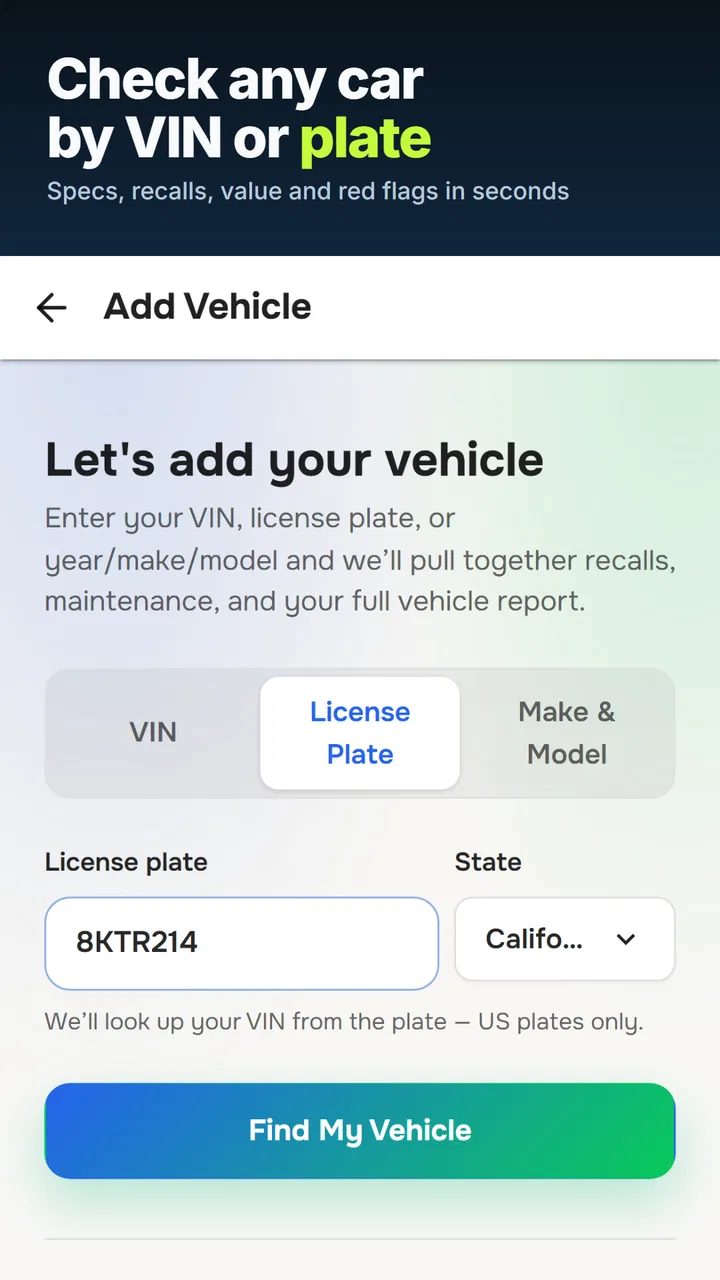
Starting with a VIN or license plate
The app’s main appeal is convenience. Instead of searching through separate sources for specifications, recalls, value information, and possible theft records, I can begin with one vehicle identifier and organize the first stage of research in one place. That matters when I am comparing several listings and do not want to keep switching between browser tabs or writing down details from different services.
A VIN is generally the better starting point when a seller provides it. It is tied to the vehicle rather than the current plate, so it is more useful for checking whether the listing’s year, engine, body style, and other identifying details match the actual car. A license plate lookup can be more practical when I am standing near a vehicle or when the seller has not made the VIN easy to find, but I still prefer to verify the full VIN before treating a result as final.
One practical habit is to photograph the VIN from the dashboard and compare it with the number on the title or other paperwork. I would not rely on a typed number copied from a message without checking it. A single incorrect character can send a lookup toward the wrong vehicle, which may make an otherwise useful report misleading.
What the report is good at revealing
The combination of specifications and engine information gives me a fast way to test a listing’s basic accuracy. If the seller describes a particular trim or powertrain but the lookup points to a different configuration, that is a reason to pause and ask for clarification. It does not automatically prove dishonesty; listings can contain ordinary mistakes. Still, the mismatch is valuable because it changes the questions I ask before arranging a meeting.
Recall information is another strong reason to use the app early. A recall does not necessarily mean I should reject a vehicle. Some recalls are repairable, and a dealer or manufacturer may be able to confirm whether the remedy was completed. The useful step is to treat the result as a prompt for verification, not as a final mechanical diagnosis.
Stolen-vehicle information has a different kind of importance. If a result raises a concern, I would stop the transaction rather than trying to negotiate around it. A suspicious vehicle history is not the sort of issue that a lower price makes acceptable. I would also compare the identification number on the car with the documents and avoid handing over money while anything remains unclear.
Using value information without treating it as a verdict
The value feature can help me judge whether an asking price deserves more investigation. I see it as a reference point, not a promise of what the car is worth in my local market. Condition, mileage, service history, accident repairs, location, equipment, season, and urgency can all move the real price away from an estimate.
A useful workflow is to record the seller’s asking price before running the lookup, then compare the two figures only after I have checked the vehicle’s identity and specifications. If the difference is large, I do not immediately assume the seller is overcharging. I ask whether the car has unusual equipment, unusually low mileage, recent major maintenance, or condition issues that explain the gap. The app helps frame the conversation, but it cannot replace local listings and a physical inspection.
Where connectivity becomes part of the experience
Because the app performs lookups and presents report information, the quality of the experience depends on being able to reach its service at the moment I need it. That is easy to overlook when planning a viewing. A basement parking area, rural road, crowded auction site, or dealership lot with weak reception can turn a simple lookup into a delay.
I would therefore run the lookup before leaving home whenever the seller has already supplied the VIN. Saving the relevant report details in a permitted personal note or screenshot can make the viewing less stressful, while still keeping the original vehicle identifier available for a second check. I would not assume that every part of the service will remain usable without a connection, so advance preparation is safer than discovering a network problem beside the car.
Mobile use at a dealership or private sale
The app makes most sense on a phone because used-car research often happens away from a desk. I can check a listing while messaging a seller, compare two cars during the same afternoon, or investigate a vehicle before accepting a test drive. That immediacy is more valuable than it sounds: a quick identity check can prevent me from spending an hour on a car that does not match its advertisement.
There is also a social advantage to doing the lookup before becoming emotionally attached to a car. A polished interior, an enthusiastic seller, and a short test drive can make me overlook inconsistencies. Reviewing the report while I am still deciding whether to visit helps keep the process analytical.
At the same time, a small screen is not ideal for a long report or careful comparison. I prefer to use the phone for the first pass and then write down the specific questions that need answers. For example, if the specifications do not match the listing, I can ask about that directly instead of scrolling repeatedly while standing beside the vehicle.
A realistic buying scenario
Imagine I find a used hatchback advertised as a particular engine and trim. The price looks attractive, but the listing contains only a few photographs. Before arranging a viewing, I enter the VIN and compare the returned specifications with the advertisement. The engine information does not line up exactly, so I contact the seller and ask for a photograph of the VIN plate, the registration document, and an explanation.
If the second check confirms the same vehicle, I then look at recall information and use the value estimate as a discussion point. At the viewing, I inspect the VIN physically, ask whether recall work was completed, and arrange a mechanical inspection if I remain interested. If the seller refuses to share basic identification or pressures me to pay immediately, the app has already done something useful: it helped me recognize that walking away is safer than trying to solve every uncertainty through negotiation.
Handling errors, delays, and incomplete confidence
Any lookup service can be affected by a mistyped identifier, an unavailable connection, or information that needs interpretation. My first recovery step is simple: recheck every character and run the vehicle through the most reliable identifier available. I would compare the result with the dashboard VIN, door-jamb label, paperwork, and seller’s listing rather than assuming the first screen is correct.
If a report takes longer than expected, I would avoid repeatedly tapping the lookup button or immediately paying for another attempt. First I would check the connection, confirm that the identifier is complete, and give the request a moment to finish. If I am at a viewing, I would move to a location with better reception or postpone the lookup until I can use a stable connection. The vehicle should not become more attractive simply because the app is temporarily inconvenient.
When the result looks surprising, I treat surprise as a reason to investigate, not as proof that the app is wrong. A specification mismatch could come from a listing error, a swapped plate, an incorrectly entered VIN, or a vehicle with a complicated history. The right response is to compare documents and ask focused questions. For a high-value purchase, I would also seek an official record check or professional advice rather than relying on one digital report.
Keeping mobile data use sensible
There is no good reason to run repeated searches for the same vehicle while walking around a lot. I would do the initial lookup once, keep the VIN with my notes, and use the report to guide the physical inspection. This reduces unnecessary requests and makes it easier to notice what still needs verification.
I also prefer using a trusted connection before purchasing an optional report, especially when the result is important to a financial decision. A stable connection lowers the chance of an interrupted transaction, although it does not change the need to read what a particular purchase includes before confirming it. Since the app is free to install but offers individual in-app purchases, I would decide in advance whether I need a basic check or a more detailed report instead of unlocking items impulsively at the dealership.
Privacy is worth considering in a practical way. A VIN identifies a vehicle, but messages, photographs, notes, and seller contact details can also reveal personal information. I would avoid sharing screenshots publicly with unnecessary details visible, and I would remove old vehicle research from my phone when I no longer need it, particularly if I regularly inspect cars for other people.
Who will get the most from it
I think the app is a good fit for first-time used-car buyers who want a structured starting point. It is also useful for people comparing several private-sale listings, drivers checking a vehicle before traveling to see it, and small-scale car shoppers who need quick specifications without building a research process from scratch.
It can be especially helpful when the listing is vague. A seller may omit the exact engine, trim, or recall status, while the app gives me enough direction to decide what to ask next. It can also help experienced buyers move faster, provided they already understand that a lookup is only one layer of due diligence.
I would skip relying on it as the only source when I need legally definitive ownership information, a complete insurance or accident investigation, or a mechanical condition report. A specialist history provider, official government record, dealer documentation, or independent mechanic may be a better choice for those needs. The app is strongest at early screening and convenient cross-checking, not at resolving every possible dispute about a vehicle.
Cost, audience, and overall maturity
VIN Check Report is free to use at the entry level, with optional purchases priced from $0.99 to $24.99 per item. That arrangement suits occasional shoppers because I can begin without committing to a subscription-style cost. It also means I should pay attention to which report elements are included before I decide that the app alone covers everything I need.
The app is rated for Everyone, which fits its practical purpose: it is a research tool rather than entertainment or a specialist workshop application. It has been available since May 21, 2015, and its reach is reflected in a 4.5 average from around 11 thousand ratings, with more than a million installs. Those figures suggest that it has found a broad audience, but they do not remove the need to judge each report carefully.
VINDecoded.com, the developer, has focused the product on vehicle identification and checks rather than turning it into a general maintenance suite. That focus is helpful when I want a quick pre-purchase screen. Someone looking for repair instructions, service scheduling, fuel tracking, or a full ownership log would need a different kind of app.
My connectivity verdict
Connectivity shapes VIN Check Report in a very practical way: the app is most valuable when I can obtain and review vehicle information at the exact point when a buying decision is forming. That convenience is real, but it also means I should prepare before entering a weak-signal location and avoid treating a delayed result as permission to proceed without checking the car.
I would recommend it as a first-pass companion for used-car shopping. Run the VIN lookup before the appointment, compare the result with the advertisement, note the questions it raises, and use the phone at the viewing to verify the vehicle’s identity. Then add the checks a mobile report cannot provide, especially a physical inspection and professional mechanical evaluation when the price or risk is high.
My final view is favorable but measured. The app turns scattered early research into a more manageable routine and can expose inconsistencies before they become expensive mistakes. Its value is highest when I use it to slow down a purchase, not rush one. For a buyer who wants a convenient VIN and license-plate screening tool, it is worth trying; for anyone expecting a complete guarantee about a used car, it should be treated as one useful layer rather than the whole answer.
FAQs for VIN Check Report for Used Cars
01What information does the VIN Check Report app provide?
The VIN Check Report app provides comprehensive details about a used car's history. This includes accident history, title status, odometer readings, recalls, and other vital data. By entering the Vehicle Identification Number (VIN), users can access a full report, helping them make informed purchasing decisions and avoid potential pitfalls.
02Is the VIN Check Report app free to use?
The VIN Check Report app offers both free and paid features. While basic information might be available at no cost, detailed reports often require a purchase. Users can choose from various pricing options, depending on the level of detail they need. It's advisable to check the app for current pricing structures.
03How accurate is the information provided by the VIN Check Report app?
The accuracy of the VIN Check Report app relies on data sourced from reliable databases, including government records and industry sources. While the app strives for accuracy, it’s important to verify information independently. Discrepancies can occur due to reporting delays or errors from data providers.
04Can the VIN Check Report app be used for all vehicles?
The app is designed to work with most vehicles that have a standard 17-character VIN, typically vehicles manufactured after 1981. Users should ensure the VIN is correctly entered. For older vehicles or those with non-standard VINs, the app might not provide comprehensive data or might be unable to generate a report.
05What are the system requirements for installing the VIN Check Report app?
The app is compatible with both Android and iOS devices. For Android users, the app requires Android 5.0 (Lollipop) or later, while iOS users need iOS 11.0 or later. A stable internet connection is necessary for accessing and downloading reports. Regular updates ensure compatibility with the latest devices and operating systems.
Pros
- Detailed history reports enhance buying confidence.
- Easy-to-use interface simplifies navigation.
- Fast processing delivers instant results.
- Covers a wide range of vehicle makes and models.
- Affordable pricing compared to competitors.
Cons
- Limited free features available to users.
- Occasional data discrepancies reported by users.
- Requires internet for full functionality.
- No option to save reports for offline use.
- Some reports lack comprehensive accident details.

VIN Check Report for Used Cars
Gallery